RXPA Parameters for RELAX
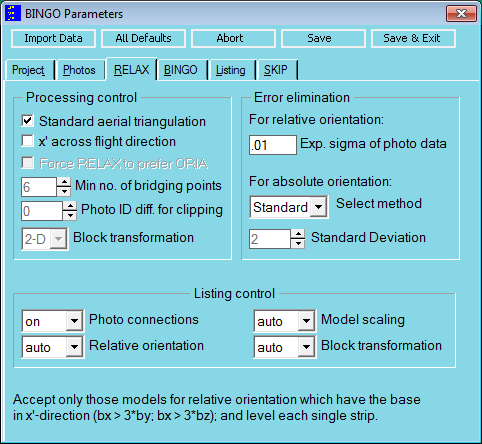
Fig. 6.3-1 Parameters for controlling RELAX.
All values on this page are set optimally for standard aero triangulations. Where other exposure situations exist, the tick in the box for ″Standard aerial triangulation″ must definitely be removed. Otherwise RELAX will not be able to determine the orientation data. See also details on standard aerial triangulation below.
Columns | format | contents/explanation |
|---|---|---|
1-4 | A4 | RXPA |
6-10 | F5.0 | SXB: Expected accuracy in the relative orientation. This value is the decision criterion for error elimination and has to have a reasonable value. Special attention has to be paid to the correct selection of measuring unit. Otherwise errors will not be detected or correct measurements will be eliminated. Default: SXB = 0.01 |
11-15 | I5 | MINCO: Minimum number of bridging points in two photos for starting a relative orientation. For the first start of the orientation of the photo of one block, a value MINCO=10 is recommended. With very high number of points per image, this value can be chosen also higher. A further program run with a smaller MINCO is necessary, if not all photos are orientated with this value. In this computation process the missing orientations will be orientated. Default: MINCO = 6 |
16-20 | I5 | CLIP: Maximum photo name difference for the relative orientation. 0 :No effect.≥1 :A relative orientation is only allowed between such photos, whose photo names differ not more than CLIP. With photo flights with strip arrangement usually a value CLIP=1 makes sense, if the photos are enumerated continually. Then strip by strip is orientated relatively, first. In the following step the strips are transformed to each other. Default: CLIP = 1 |
21-25 |
| % |
26-30 | I5 | TRAF: Block transformation parameter 2 :Two-dimensional transformation3 :Three-dimensional transformation Default: TRAF = 2 |
31-35 | I5 | KARI=1: For oblique photos the aerial photo orientation ORIA will be applied as well, instead of ORIT. Default: KARI = 0 |
36-40 | I5 | SAT: Key for standard aerial triangulation 0 :off1 :on. If this parameter is set on, it is supposed that regular aerial photo are given. That means that all flight lines flew horizontally with vertical exposure direction, x' points towards flight direction or opposite (and not at right angles to the flight direction!), and the photos are numbered in ascending sequence within the flight lines (gaps are allowed). If this option is set on, the program internally sets the parameters MINCO, CLIP and TRAF on their default values and the parameter KARI on 1. Every flight line is then levelled with an average Omega of Zero. Relative orientations are only allowed between directly neighboured photos within the same flight line. See more details below. Default: SAT = 1 |
41-45 | I5 | RANS: Key to eliminate errors in the block transformation -1 :without any error elimination0 :Standard error elimination due to the largest residuals1 :RANSAC error elimination. All parameters for this error elimination are set internally in the program. In case of RANSAC, the program performs a number of trials. Three transformation points are chosen randomly in every sample. Based on the best result, all further points can be checked on their compatibility and, in case of exceeding a threshold, be excluded from the transformation. Default: RANS = 0 |
46-50 | F5.0 | STDV: Expected standard deviation of the block transformation in mm in the photo space. Because the only purpose of this application is to eliminate gross errors, which can considerably falsify the initial orientation data and point coordinates, a value of 1.0 to 2.0 should lead to good results. Default: STDV = 2.0 |
51-55 |
| ACROS: Like standard aerial, but x' is perpendicular to flight direction. |
56-65 |
| % |
66-68 | I3 | LCON: Listing of connections between the photos (Graph). (=0, 1, 2) |
69-71 | I3 | LREL: Listing of relative orientation processes (=0, 1, 2, 3) |
72-74 | I3 | LSCAL: Listing of model scale estimations (=0, 1, 2, 3) |
75-77 |
| % |
78-80 | I3 | LTRA: Listing of block transformations (=0, 1) |
The most important parameters for RELAX are SAT, MINCO, CLIP and TRAF. They control the program process and decide about the success of the initial approximations computation. In many cases the Default-values can be used. But often other values are urgently required.
TRAF is responsible for the transformation of the blocks into the global coordinate system. At the beginning, the computed blocks respectively strips of models are defined in a local coordinate system with its origin in the left photo of the first model of each block. These blocks are transformed to the control points respectively to the neighboured blocks or strips.
With terrestrial images and oblique aerial photos (SAT=0), this transformation has to be effected three-dimensionally in every case. For nearly all standard aerial triangulations (SAT=1) the two-dimensional transformation provides the best results, because single flight lines cannot be slope in the space.
The listing parameters LCON up to LTRA do not influence on the program computation. They decide only about the content of the RELAX LIST files. The parameter to list photo connections can be set ″on″ or ″off″. The default value for all other listing parameters is One which correspondents to ″auto″. This means, that only a listing will be done when problems arise. For huge blocks or if there are many points are per image, it is recommended to set all these listing parameters zero or ″off″.
The value KARI=1 is used in case of using GPS-data or IMU angle values in the adjustment for oblique photos. Therefore a unique aerial photo orientation is assured for each photo.
The other statements PARA and LIST in this chapter do not have any influence for RELAX.