SPAR Parameters for SKIP
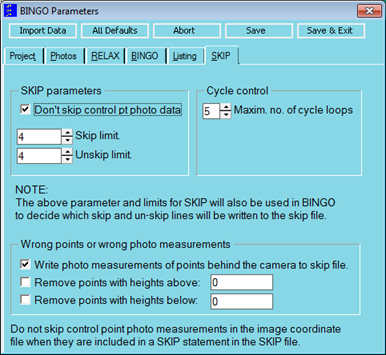
Fig. 6.3-2 Control parameters for SKIP.
Columns | format | contents/explanation |
|---|---|---|
1-4 | A4 | SPAR |
5-10 | I5 | NoGCP blank =no action1 =The SKIP-action is not executed for photo measurements of control points. Default: NoGCP = 0 |
11-20 | F10.0 | SkipLim blank =no action≠ 0The SKIP-action is only executed if the normalized residual wi exceeds the limit value skip_limit. Default: SkipLim = 0 |
21-30 | F10.0 | UnskLim blank =no action≠ 0The Unskip-action is only executed when the residual vi is smaller than the limit value unskip_limit. Default: UnskLim = 0 |
31-35 | I5 | Ncycle Maximum number of BINGO and SKIP cycles after starting “Cycle” in the menu. Default: Ncycle = 5 |
36-40 | I5 | Behind 0:No Action1:Remove points behind photo plane |
41-45 | I5 | Above 0:No Action1:Remove points higher than upper height limit |
46-50 | I5 | Below 0:No Action1:Remove points lower than lower height limit |
51-60 | F10.0 | upper height limit = <value> |
61-70 | F10.0 | lower height limit = <value> |
The SPAR statement performs the running of the programs BINGO and SKIP.