6. BINGO PROJECT file
The BINGO PROJECT file contains all parameters for the processing control of the programs RELAX, BINGO and SKIP. In case of existence it is read and evaluated by these programs. Its default name is project.dat. If another name is used, it has to be indicated during the program start by means of a run string. This task will be performed by the BINGO manager.
Example :SKIP proj1.dat
Note: All data in this file will be created by the BINGO Graphical User Interface (GUI).
The definition of all parameters as well as the file name and the handing over of the run string to RELAX, BINGO and SKIP are effected by the graphical user interface (GUI). Therefore it is not recommended to edit this file manually.
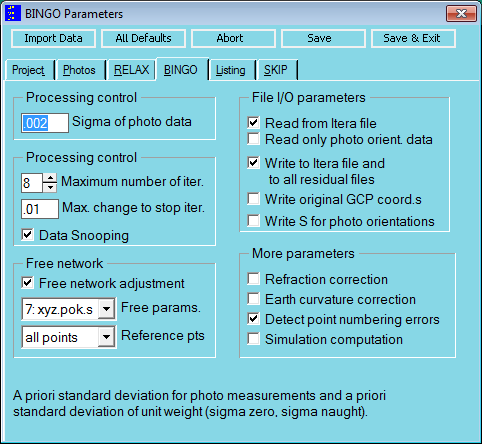
Fig. 6-1 Setting the BINGO parameters by means of the GUI
Only data differing from the Default-values are written into the BINGO PROJECT file by the GUI. A list of Default-values is created by the program BgoPara, as soon as the command "BgoPara –d" is entered at the system prompt, but the BINGO-Manager has to be urgently started before. The Default-values are then listed in the file defaults.lis in the \Bingo\bin\ directory.
For existing data files, the data can be imported from any other corresponding file into the GUI (graphical user interface). Then the data are written with the button "Save" or the keys "Ctrl+S" onto the PROJECT file. Only afterwards they are at disposal for the programs. The GUI can be left open during processing. "Ctrl+X" corresponds to "Save & Exit".
The name for the BINGO PROJECT file can be changed on the GUI only in the BINGO Manager menu "File / Project File". The BINGO programs cannot be started from the system prompt, but only from the menu.
The single parameters are described in the following chapters:
Name | Contents / Explanation |
|---|---|
6.1 Project description and file names | |
TEXT | text: project name |
diverse | File names |
C | comments |
END | end of data |
6.2 Image parameters | |
IMAG | Selected photo names |
IMPA | Parameters for selecting points in the photos |
SKIP | De-activating all measures of one point |
6.3 Program control parameters | |
RXPA | Control parameters for RELAX |
PARA | parameters for BINGO processing |
LIST | BINGO list parameters |
SPAR | Parameters for SKIP program |