9.1 Program processing
A precondition for the use of BINGO is a high-performance 64-bit workstation with Windows 7, 8 or 10. As main memory at least 16 GB should be available. For very large data sets (e.g. 60.000 photos) 64 GB are recommended. BINGO uses large scratch files. Thus free disk space of at least 50 GB is advisable.
It is recommended to save all files belonging to a particular project in a separate directory (folder). For initial trials, examples are already available in \Bingo\DemoData\. Your own projects should not be stored under \Bingo\ but in a separate directory e.g. \BingoWork\ProjectX\.
All BINGO programs and BINGO tools can be started from the BINGO manager using the menu. Buttons are provided in the graphical user interface (GUI) for most common applications.
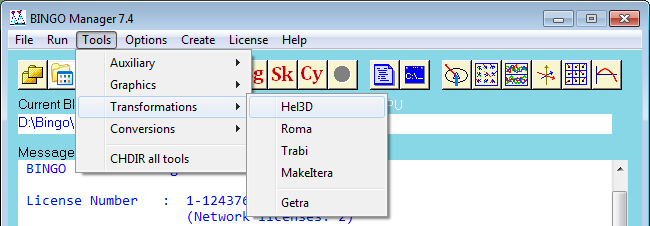
Fig. 9-1 Menus and buttons in the BINGO Manager
The user settings of the tools (*.ini files) are written to the directory \Bingo\bin\ini\. These .ini files – and only these – may be deleted at any time. At the next start the respective default values programmed will then be used.
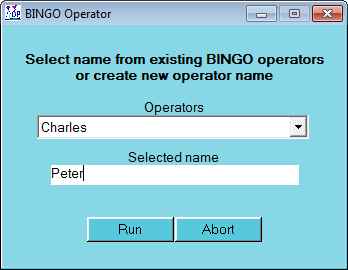
Fig. 9-2 BINGO Operator
If different settings are to be stored for different users, then the BINGO manager should be started from the Boper program (BINGO Operator).
The operator name is displayed in the BINGO manager. The individual settings for each operator are stored in a separate subdirectory \Bingo\bin\Name.bop\.
In most cases it usually makes sense to use the default names for all files. If other names are to be used, then they should be assigned in the parameter window (Fig. 6.1-1). If the name of the BINGO PROJECT file (Default= project.dat) has to be changed, this can only be done directly in the BINGO manager menu ″File / Project file″. For this the parameter window must be closed.
BINGO can process blocks of almost any size. The current limits can be displayed using the menu; e.g.: ″Help / ? Bingo″.
Limits of band widths normally restricting the processing capacity for photogrammetric block adjustments do not exist in BINGO.