3.1 Overview
The program system BINGO consists of the three main components RELAX, BINGO and SKIP. All of these three are designed as batch programs. They do not work interactively. The user creates the data input files (possibly with one of the optional user interfaces) and runs the programs. After this the results will be assessed by means of the created LIST files.
Fig. 3.1-1 Structure of the BINGO components
The BINGO tools on the other hand nearly all have their own Graphic User Interface (GUI) and are designed for working interactively.
BINGO programs:
- RELAX calculates the initial approximations of photo orientations and point coordinates as far as these can be computed from the photo measurements.
- BINGO performs the adjustment.
- SKIP marks faulty photo measurements in the file of the photo measurements or eliminates those marks.
Tools for graphic representations:
- REPLO: Display on screen of all adjustment results in the object space such as residuals of the test and pass points as well as the GPS measurements, orientation of the footprint, figures of the confidence ellipses, etc. (REsidual PLOtting).
- ImgView: Display of the photo measurements and their residuals for individual photos or groups of photos. Likewise missing photo measurements (compare LIMBO) as well as the number of photo rays per point can be displayed.
- GPSview: Display of residuals of GPS and IMU data in sequence of photo numbers.
- 3dView: Interactive 3D viewer for display of all adjustment results in the object space. Optionally image connections as well as the tie points with photos, the residuals of the photo measurements, spatial footprints, confidence ellipsoids and other details can also be displayed.
- IMPLO: Display on screen of the residuals of photo measurements for all photos of one camera at once, added up for chosen number of photo segments. In addition a list-file named implo.lis will be created. This program is used for the recognition of systematic image errors.
- ADPLO: Display on screen of the effects of the additional parameters on the image geometry (self-calibration). For subsequent processing in photogrammetric systems a grid file can be created by BgExport.
Transformation tools:
- HEL3D: 2D- or 3D-transformation of point clouds on a reference system. The program also transforms image orientations in the ITERA file including the associated angles of rotation. Robust error elimination using the RANSAC method (Random Sample Consensus).
- TRABI: Transformation of photo measurements to given reference points e.g. fiducial marks. The kind of the transformation can be chosen as required and may have zero to eight parameters.
- ROMA: Rotation, translation and scaling of photo measurements. The transformation parameters can be chosen as required.
Conversions: This group of programs serves the preparation of the data for processing with BINGO and the retransmission of the BINGO results in special photogrammetric systems.
- OrmToBgo: Pre-processing of ORIMA photo measurements for processing with BINGO.
- AngToMM: Conversion radial symmetrical camera distortion which is given in field angles, into a table with equidistant values [mm].
- BgExport: Conversion of BINGO adjustment results to various other ASCII formats.
- BIPEX: Generation of model files from BINGO results in Zeiss PHOREX format.
Others:
- SAMBA: Selection of photo measurements for processing in BINGO based on chosen image areas and a chosen number of tie points.
- LIMBO: Lists missing photo measurements. These are measurements of points, which due to their geometrical position in photos must be visible, but have not been measured.
- ImgClean: Remove S-lines and unused points and photos from the IMAGE COORDINATE File. This program is used to edit the image measurements in case the file shall be transferred to other photogrammetric systems.
- TieCheck: Checks and lists the number of common points between adjoining images as well as common points with the next ones.
Batch programs:
- For the programs ImgClean, BgExport and Samba there are also versions available for an automised processing in batch mode: ImgCleanBt, MakeGrid und SamBatch.
- BingoRunner: A modern command-line tool for running BINGO processing workflows without the BINGO Manager. It can run RELAX, BingoMP, and SKIP separately, or execute complete pipelines from a script or terminal. It supports solver selection, diagnostics, version reporting, logging, and timeouts, making it suitable for automated processing, testing, and batch workflows.
Input files:
The most important data input files for RELAX, BINGO and SKIP are the IMAGE COORDINATE file containing the photo measurements, the GEO INPUT file with all further measurements and the PROJECT file containing process control data. These files are read by all the three programs.
RELAX provides the initial approximations of all photos and point coordinates for BINGO in the ITERA file. If RELAX recognises faulty measurements during the calculations, they will be listed in the SKIP file for further processing with SKIP.
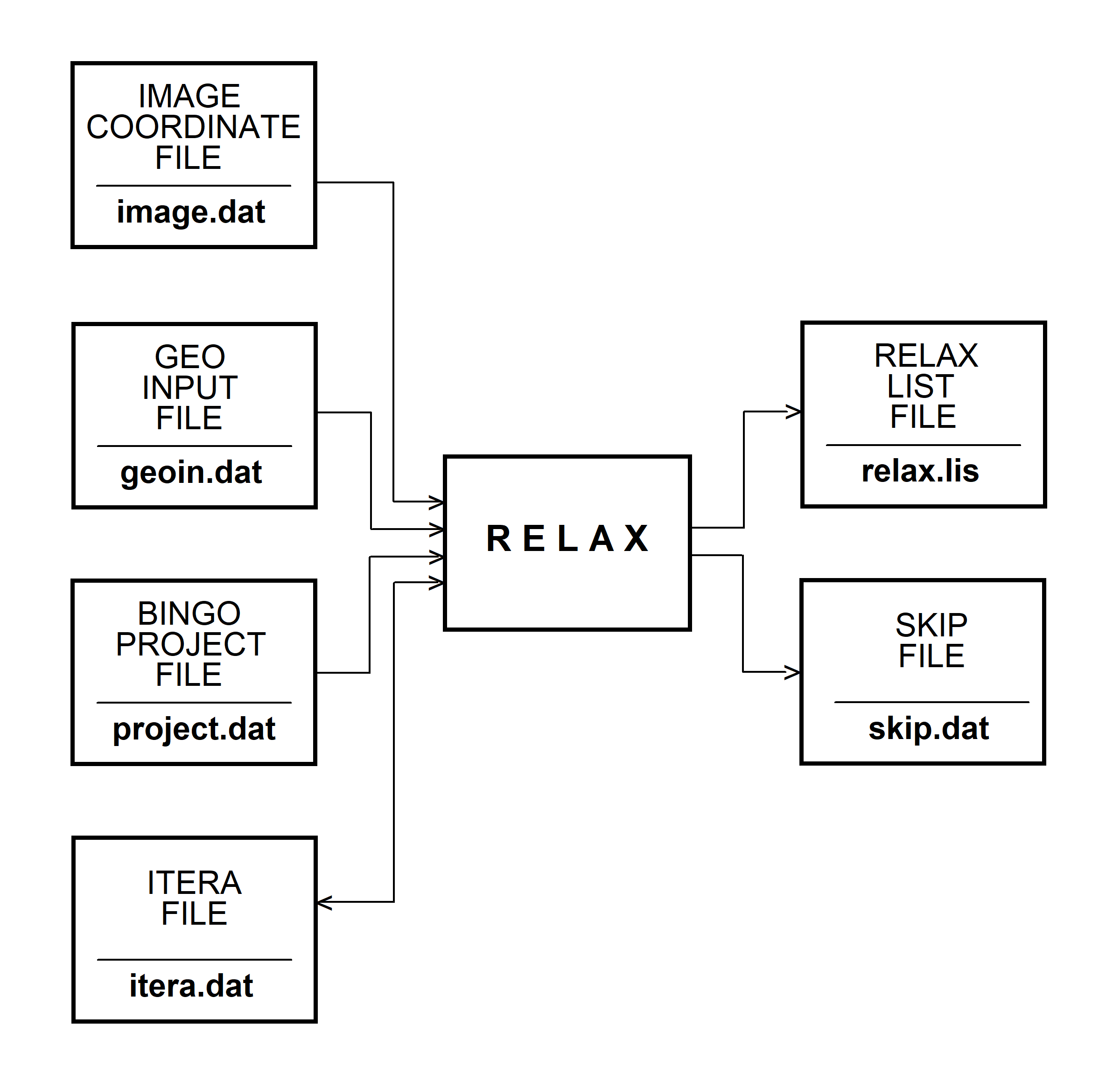
Fig. 3.1-2 RELAX data flow chart
BINGO reads the photo coordinates from the IMAGE COORDINATE file and all other measured data like control points, camera data etc. from the GEO INPUT file. For eventual GPS-data there are no default file names. The actual file names for this data type are read together with further information from the GEO INPUT file.
The ITERA file is overwritten after the adjustment with new adjusted photo orientations and point coordinates. In addition to the process report in the BINGO LIST file, the residuals of the control points are stored in the file reselli.dat together with the data for the confidence ellipsoids of all points. The residuals of the GPS-data are stored in the file gpsresi.dat.
The files reselli.dat and gpsresi.dat together with the ITERA file form the basis for a graphical output with the BINGO tools. Like RELAX, BINGO writes recognised errors in the image measurements on the SKIP file, too.
The program SKIP reads the photo measurements from the IMAGE COORDINATE file and the already recognised data errors from the SKIP file. The faulty photo measurements are marked in the IMAGE COORDINATE file. Contrarily, SKIP reactivates photo measurements, which have been rejected without good reason. So they can participate in the next adjustment again. The old IMAGE COORDINATE file is renamed to old-image.dat.
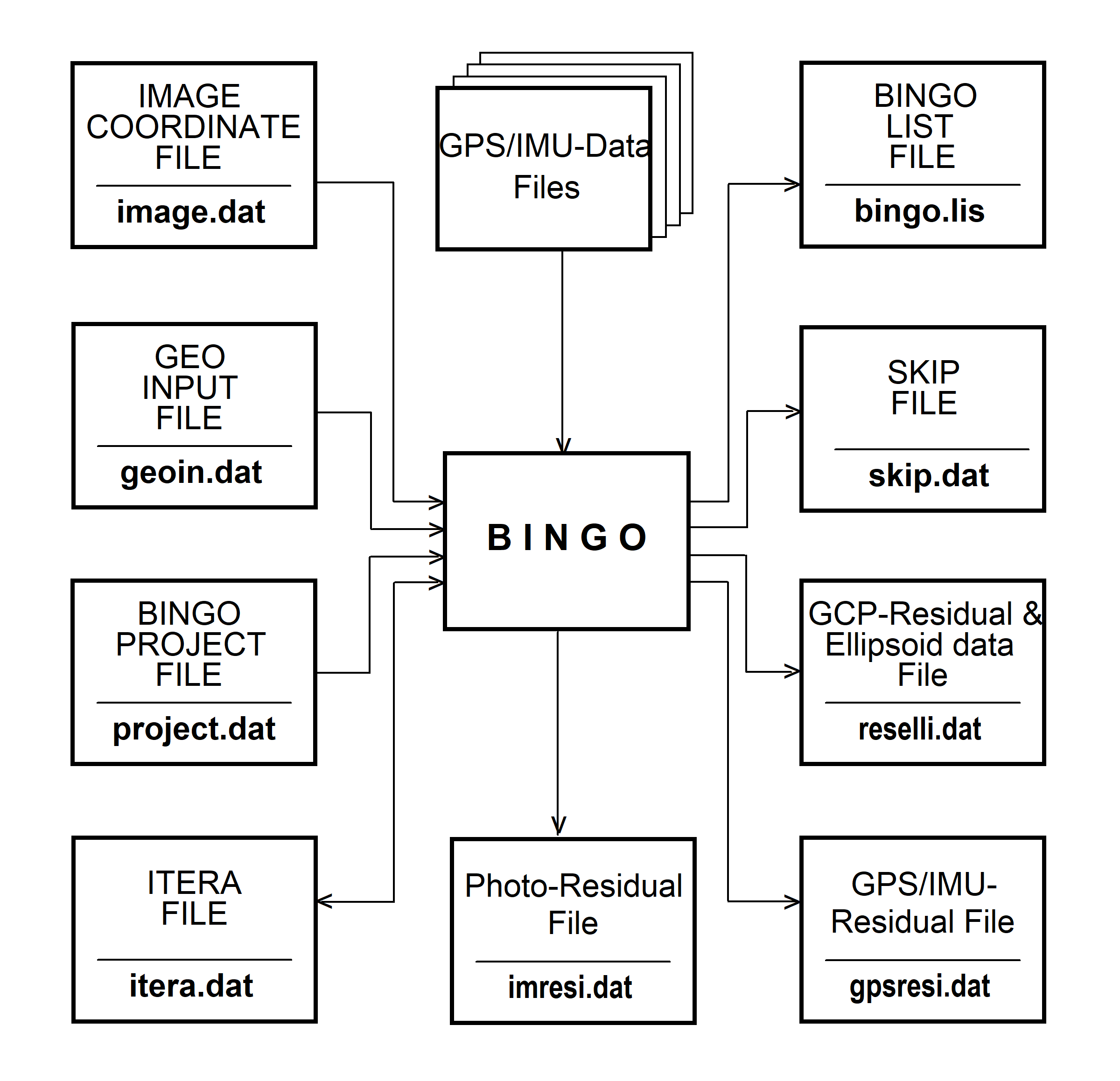
Fig. 3.1-3 Data flow for BINGO
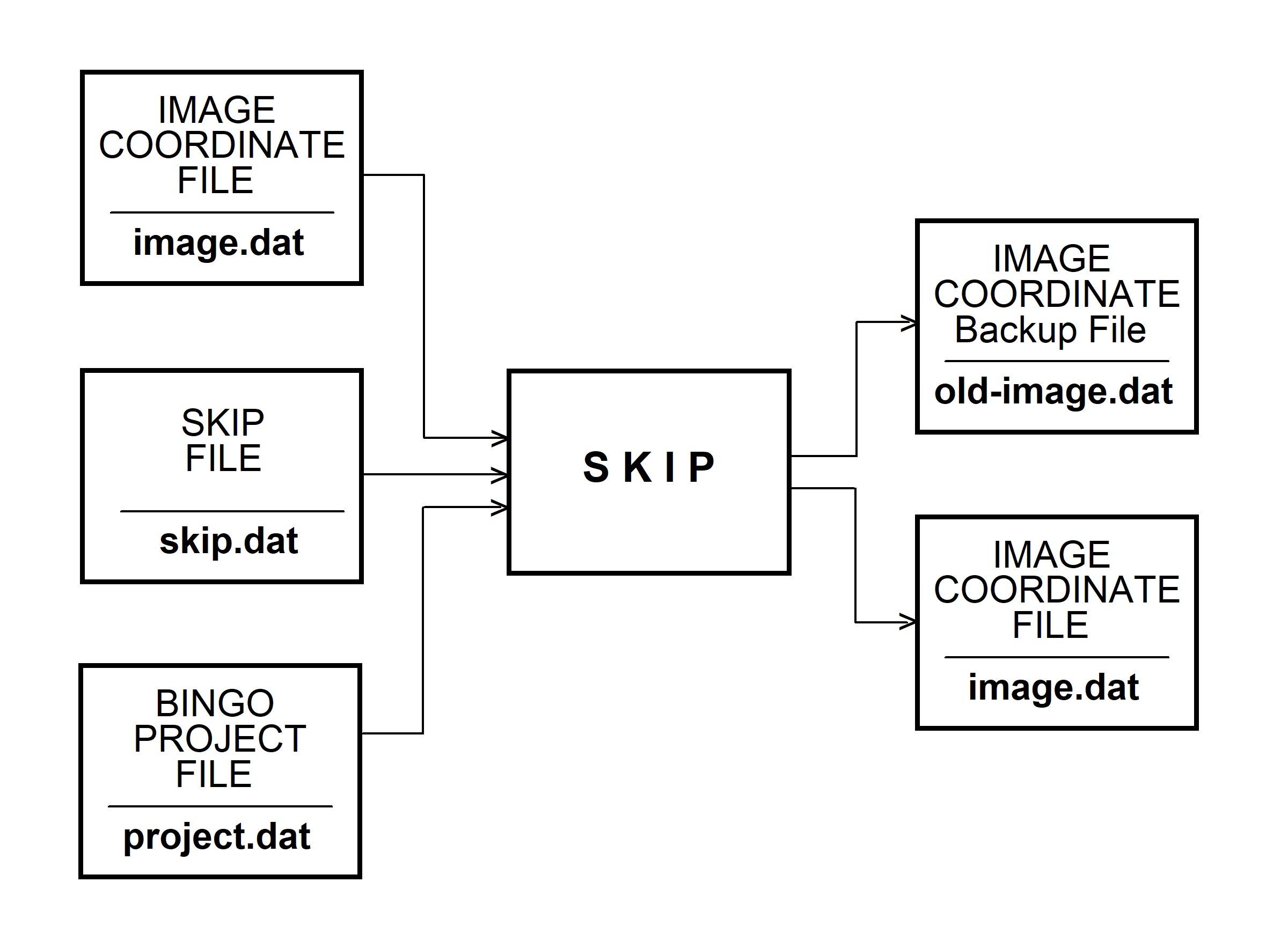
Fig. 3.1-4 Data flow for SKIP
Hint: In all BINGO ASCII files a line will be set inactive by a Star "*" or a hash sign "#" in column 1 of the line.