BINGO 7.1 - November 2018
This page describes BINGO as it existed at the stated release date. For current behavior and requirements, use the current Manual, Reference, and Guides.
BINGO & RELAX
Output files from these two programs contain now in the file header beside the BINGO revision number as well the license ID under which these files have been created, and the creation date and time.
Example:
BINGO 7.1 Nov. 2018
Bundle Block Adjustment
- Including Free Network and Survey Network Adjustment -
===========================================================================================
SN 1-1243767 2018, November 14., 17:22:35
SAMBA
Program SAMBA has been extended to handle the image format for photos from different cameras separately. Different cameras might have different format sizes.
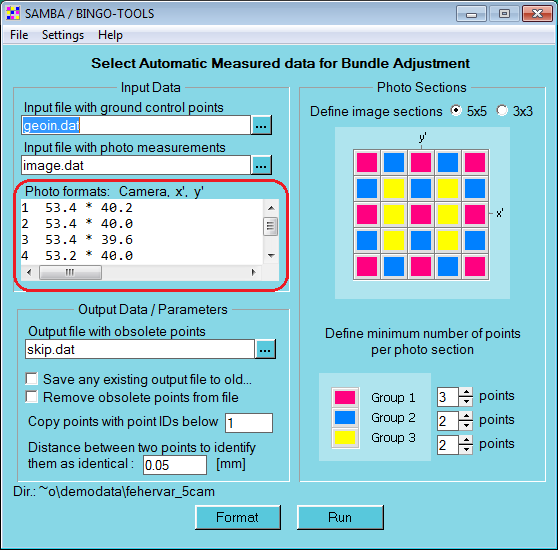
The photo format will be estimated when pushing the Format button. The format cannot be entered manual anymore.
New Batch Programs
Three new batch tools are developed from existing BINGO tools. One batch program is completely new. These new tools have no graphical user interface and can be started – contrary to all other tools – without open BINGO Manager.
| Original Program | New Batch Program |
|---|---|
| ImgClean | ImgCleanBt |
| BgoExport | MakeGrid |
| Samba | SamBatch |
| % | TieCheck |
The processing parameters for programs ImgCleanBt, MakeGrid, SamBatch and TieCheck can be defined in a runstring. If no runstring is given, all default values will be used.
Runstring parameters are position depending. If e.g. a parameter no. 6 shall be given, all parameters 1 to 5 have to be given in the runstring as well.
These programs can be started as well in BINGO batch mode. See as well BBMAN help.
ImgCleanBt
This program cleans the photo coordinate file image.dat from unused and BINGO specific data lines.
All point IDs and photo IDs in use will be read from file itera.dat. Photo measurements will be read from file image.dat. A new cleaned image file will be created.
Processing parameters may be given in the program’s runstring:
-
- Key to remove skipped lines. Default 1 (=remove)
-
- Key to remove lines with * or # in column 1. Default 1
-
- Key to remove photo measurements of unused points. Default 1
-
- Key to remove photo measurements of unused photos. Default 1
-
- Key to ignore any line END in column 1 to 3. Default 1 (=ignore)
-
- ITERA input file name. Default itera.dat
-
- Input file name for photo coordinates. Default image.dat
-
- Output file name with cleaned photo coordinates. Default imageNew.dat
All parameters are optional and position depending. The default values will be used for missing parameters. If e.g. a parameter no. 6 shall be given, all parameters 1 to 5 have to be given in the runstring as well.
Please compare as well file \Bingo\bin\help\ImgCleanHlp.wtx
MakeGrid
This program reads from the ITERA file the values of additional parameters and camera definitions and creates a correction grid in image space for a selected camera.
The following input parameters will be read from the program’s runstring:
-
Name of selected camera (char*15)
-
Width of grid meshes or step width for radial curve (real)
-
Input file name. Default itera.dat
-
Output file name. Default grid.dat
-
Grid type, 1= ASCII grid; 2= Z/I grid. Default 2
-
Grid content, 1= from all parameters; 2= from only radial; 3= from only non-radial. Default 1
Parameters one and two are obligatory; all other parameters are optional and position depending. The default values will be used for missing parameters. If e.g. a parameter no. 6 shall be given, all parameters 1 to 5 have to be given in the runstring as well.
Input examples from the ITERA file:
*   <____Camera_ID_><_Par.No_><__Parameter_Value_><__user_defined_FF_><__Sensor_Type_><____FF_from_x'_y'_>
APAV            Cam1         7       -0.386334E-03        0.222220E+01             UCX        0.222220E+01
APAV            Cam1         8       -0.259474E-02        0.222220E+01             UCX        0.222220E+01
APAV            Cam1       117        0.111945E-02        0.222220E+01             UCX        0.222220E+01
APAV            Cam1       131       -0.508708E-03        0.222220E+01             UCX        0.222220E+01
or
*   <____Camera_ID_><_Par.No_><__Parameter_Value_><__user_defined_FF_><__Sensor_Type_><____FF_from_x'_y'_>
APAV               4        17       -0.293176E-01        0.383330E+01                        0.383330E+01
APAV               4        18       -0.144367E-01        0.383330E+01                        0.383330E+01
APAV               4        65       -0.504752E-02        0.383330E+01                        0.383330E+01
APAV               4        66        0.170022E-01        0.383330E+01                        0.383330E+01
Runstring:
D:\Bingo\DemoData\UCX_Deventer>\Bingo\bin\MakeGrid Cam1 8 itera.dat AsciiGrid.dat 1
Output in the grid file might look as follows:
* Correction Grid From BINGO´s Additional Parameters
* ---------------------------------------------------
*   Camera               :  Cam1
*
*   step width           :    8.00
*   x´, y´ min. and max. :  -64.00   64.00
*
        0.0       0.0     -64.0     -64.0
        0.0       0.0     -56.0     -64.0
        0.0       0.0     -48.0     -64.0
        0.0       0.0     -40.0     -64.0
        0.0       0.0     -32.0     -64.0
         :         :         :         :
         :         :         :         :
Runstring:
D:\Bingo\DemoData\Fehervar_5cam>\Bingo\bin\MakeGrid 4 8
file_version: 1
begin gridgroup "Image deformation grids"
    enabled:     yes
    order_index: 0
    camera_name: "4"
    description: "BINGO self calibration grid - from all additional parameters"
    begin grid "Image deformation grid 1"
        enabled:       yes
        inverse_scale: 1.000000
        columns:          11
        rows:             11
        description:   "Created by program BgExport"
        begin gridpoints
               -40.0468    -40.0091    -40.0000    -40.0000
               -32.0407    -40.0047    -32.0000    -40.0000
               -24.0341    -40.0009    -24.0000    -40.0000
                  :           :           :           :
                  :           :           :           :
                24.0262     39.9602     24.0000     40.0000
                32.0308     39.9618     32.0000     40.0000
                40.0357     39.9629     40.0000     40.0000
        end gridpoints
    end grid
end gridgroup
The grid has to be used to correct given image coordinates e.g. from bundle adjustment to find the point position in the digital images. To find the correction value for given coordinates x’ y’, interpolation inside the related grid mesh has to be performed.
Please compare as well file \Bingo\bin\help\BgExportHlp.wtx
SamBatch
This program reduces the number of tie points in a bundle block. Control points and check points are protected and will not be reduced.
SamBatch reads all data from file image.dat and selects the names of control points and check points from geoin.dat. The photo measurements to be removed will be output to file skip.dat. The final elimination of those photo measurements has to done by program SKIP.
The number of sections in the photos is fixed to 5x5. Any existing SKIP file will be overwritten.
Processing parameters must be given in the program’s runstring:
1.– 3. Min. number of points in van Gruber locations (red areas) Min. number of points in blue areas (compare GUI of program SAMBA) Min. number of points in yellow areas. Default 3 2 2
-
Input file with given photo measurements. Default image.dat
-
Input file including control points to be protected. Default geoin.dat
-
Output file with measurements to be removed. Default skip.dat
-
Key to really delete obsolete measurements from file. Default 1 (= delete)
-
Threshold for identical points coordinates. Default 0.050 (= 50 µm)
-
Point IDs lexically below this name will not be processes (e.g. for fiducials). Default 1
All parameters are optional and position depending. Parameters 1 - 3 can be given only together. The default values will be used for missing parameters. If e.g. a parameter no. 6 shall be given, all parameters 1 to 5 have to be given in the runstring as well.
Please compare as well file \Bingo\bin\help\SambaHlp.wtx
TieCheck
This new program checks the number of tie points along flight lines.
TieCheck reads the BINGO image coordinate file and sorts all measurements according to ascending photo and point IDs. The next steps are:
- Find the number of common points between to neighboured photos.
- Find for each photo the number of common points which are in both (the prior and the next) neighboured photos.
- Create a list file for all photos and their tie point connections.
The purpose of this program is to check the connections before the bundle triangulation starts.
Processing parameters must be given in the program’s runstring:
-
- Input file with given photo measurements. Default image.dat
-
- Output file with the number of tie connections. Default TieCheck.lis
The two parameters are optional and position depending.
Example for the listing file:
