BINGO 6.6 - October 2014
This page describes BINGO as it existed at the stated release date. For current behavior and requirements, use the current Manual, Reference, and Guides.
BINGO
Radial variance component estimation for photo measurements has been introduced to check precision of photo measurements as function of the photo radius. Eight radial groups will be built with the same number of points. The radial values of the groups can alternatively be set manually by means of a GRUP statement (see manual).
For correct results the Test Value of Photo coordinates has to be close to 1.0.
If the Test Value of Photo coordinates is in a range of [0.75, 1.25], the radial Test values will be Normalized to allow comparing of results from various cameras.
The normalized radial test values can indicate:
Systematic image errors (image deformation),
measuring errors in photo coordinates or
variations of precision of photo measurements depending on the photo radius.
| A posteriori variance-component estimation for all observation groups Test value = s(a posteriori) / s(a priori) Group Test Value No. of Obs. Redundancy --------------------------------------------------------------------------------------------- Photo coordinates : 0.91 1308 380.87 Camera data incl. vector e' : 0.43 3 0.02 Coordinates of control points : 0.88 54 31.11 Control points in X : 0.80 18 12.07 Control points in Y : 0.78 18 12.15 Control points in Z : 1.13 18 6.90 ---------- ---------- Sum of all observations : 0.91 1365 A posteriori variance-components of photo measurements as function of photo radius Radius 0.0 45.7 74.7 81.7 87.2 98.2 113.5 120.5 145.6 Group 1 2 3 4 5 6 7 8 No. of points 82 82 82 82 82 82 82 80 Mean redundancy 0.38 0.30 0.32 0.31 0.32 0.27 0.22 0.20 Test value 0.54 0.70 0.99 0.95 0.87 1.12 1.15 1.03 Normalized 0.59 0.77 1.08 1.04 0.95 1.23 1.26 1.13 |
|---|
On requests from several BINGO maintenance customers we have introduced the D.C.Braun parameters K1 to K4, P1 and P2. However, we removed it again, because every company using these parameters has their own adaption with own normalization and own scales. Thereforee nothing is compatible.
We introduced one new additional parameter number 39. It is very helpful for semi-metric cameras like from Canon.
Furthermore we changed two additional parameters: Numbers 9 and 10. The variations are very small, but we believe they will provide better results.
Old Parameter Versions New Parameter Versions
The DIAX statement has been removed, because there is no sensful application anymore.
Recovery mode and the RECO statement have been removed from BINGO. Instead of this mode a file named itera.tmp will be written after every iteration into the working directory. Please see as well manual BgoManual-66-Eng.pdf page 104.
English and German Manual are up to date. To see changes in the manual refer to files BgoManual…(red).pdf.
BBMAN
The programs BEBI, STRIBI and MAKEMD have been removed from the BINGO tools.
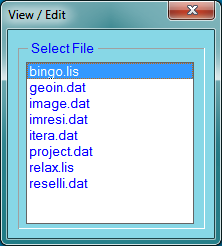
The View / Edit function has been corrected to show all files in the current working directory (without temporary matrix and graphics files).
Graphics programs
The default background color has been changed to white for all programs except program 3dView.
All graphics programs are now starting with a file selection window. As long as this window is open, a change of project directory in the BINGO Manager will influence the open window.
From the graphics windows menu a return item to "File Selection" is available.

All new items below are described in detail in the help-files of the programs.
3dView
Pan with left button down, new point with middle mouse click – like in the prior version.
Zooming the complete graphics with mouse wheel; zooming dZ only with mouse wheel and left Ctrl or Shift button down.
Click any object in the graphics window with right mouse button. The object ID will show up in the BINGO Manager’s message window. It can be marked there with the mouse and copied to the paste buffer using "Ctrl C". Then it can be copied from the paste buffer to Bingo Parameter window using "Ctrl V".
For preconditions of this function please see help-file.
Pop-up functions are now working correct under Windows 7 or 8.
REPLO
Zoom with mouse wheel, pan with left button down, new point with middle mouse click – like in the prior version.
Click any object in the graphics window with right mouse button. The object ID will show up in the BINGO Manager’s message window. It can be marked there with the mouse and copied to the paste buffer using "Ctrl C". Then it can be copied from the paste buffer to Bingo Parameter window using "Ctrl V".
Alternatively the IDs can be sent to a pipe named “picked_points”. See help-file for details.
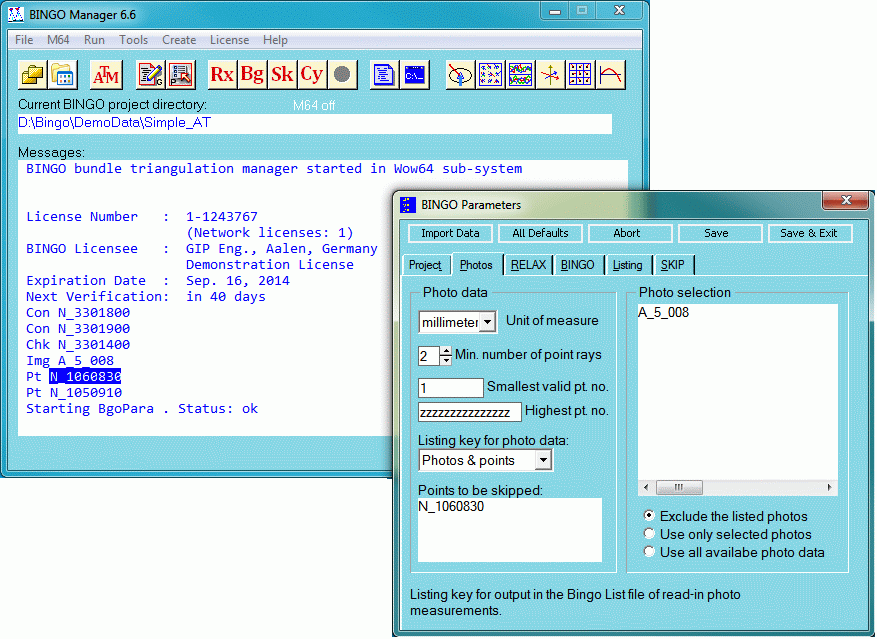
BgoPara, the BINGO parameter windows
A problem with the "_" underscore character has been corrected. This character can now be typed into the edit-boxes in page Photos above.
ImgView
Moving the curser to any point, the point ID will show up in the lower left corner of the window.
GpsView
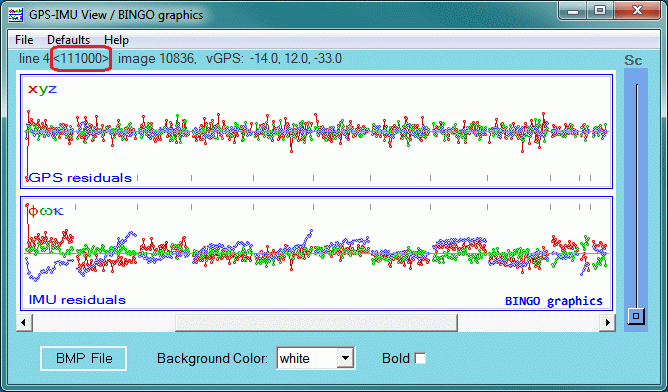
Selected shift and drift parameters per flight line are displayed in the upper left corner of the window.
BMP-Files can be created "Ctrl S" and the graphics window can be copied to the paste buffer "Ctrl C".
Background color can be changed; all items can be displayed bold.
Zooning can be done with middle mouse wheel, panning with left mouse button down. The pan will be performed after the left mouse button is released again.
Implo & Adplo
Graphical output is now limited to the image frames.