BINGO 6.5 - November 2013
This page describes BINGO as it existed at the stated release date. For current behavior and requirements, use the current Manual, Reference, and Guides.
Small enhancements have been made to nearly all programs. The manuals do not yet include changes and new functions. They will be updated shortly.
The announced enhancements for the graphics programs 3dView and GPSview have been postponed. Instead we have made the BINGO program with really much, much effort considerably faster to allow processing of very big blocks with acceptable speed.
BINGO
The function ″Recovery Mode″ has been removed. Instead BINGO writes an ASCII file named ″itera.tmp″ after each iteration. If the program terminates normally, this file will be deleted. In case of a crash or when the user kills the program, this file will remain in the project directory and can be used (renamed) as a new itera.dat file.
The internal program structure for matrix processing has been completely changed in order to speed the processing up. To show the effect we have processed six example blocks with very different configurations. Every block was running two iterations, inversion and data snooping.
| Block Name | Photos | Points | Time BINGO 6.4 | Time BINGO 6.5 |
|---|---|---|---|---|
| Montgomery | 2 728 | 8 284 | 52 sec. | 30 sec. |
| Oder River | 3 033 | 20 772 | 1 min. 20 sec. | 45 sec. |
| Three Heights | 1 287 | 27 524 | 1 min. 57 sec. | 58 sec. |
| Spaghetti | 4 380 | 120 609 | 20 min. 39 sec. | 7 min. 24 sec. |
| Vancouver | 7 230 | 95 587 | 24 min. 48 sec. | 10 min. 12 sec. |
| Sierra Ecuador | 7 220 | 714 892 | 28 h. 12 min. 14 sec. | 3 h. 21 min. 57 sec. |
For huge blocks with many points the processing time is reduced by a factor of nearly 10.
The block structure and the number of points influences the computation time considerably. In order to have acceptably times the number of photo measurements per photo should not be much more then 100. In case, usage of program SAMBA is highly recommended (see below).
Check-point handling has been enhanced and corrected.
SAMBA
Already earlier this year, the program has been enhanced and made more intelligent. A bug has been removed. Some customers have downloaded this version already.
For practical use we recommend the following settings to reduce the number of photo measurements per photo as a maximum:
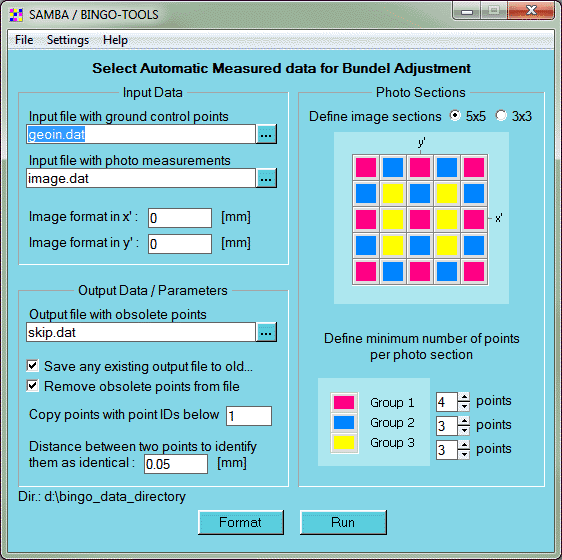
For the most applications it’s sufficient to have the settings below. They guarantee 65 photo measurements per photo (if available in input file).
In practice more photo measurements will remain because of requirements from the neighboured images.
See as well the comments in chapter ImgClean.
BingoM64
The compression function for the matrices has been switched off because of a problem with (only) one large data set.
The available RAM will now be used intensively to buffer the input/output of all matrices and other data written to files.
ImgClean
This new tool is now available in the BINGO Manager in the menu under Tools / Auxiliary to clean the photo measurement file from skipped lines and unused point and photo data.
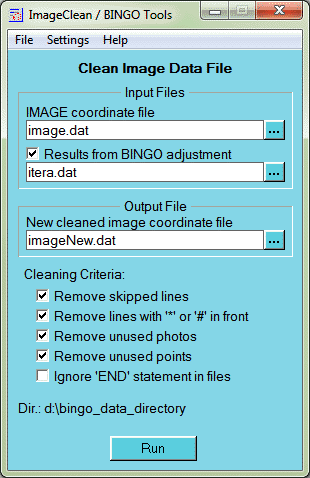
The purpose of this program is to create a clean image coordinate file which can be transferred to other photogrammetric systems.
It might be used as well before running SAMBA, because SAMBA does not care about unused images. Point selection will be better, when only the images to be used are processed.
3dView
According to settings in the ″pop″ page items should pop-up when the mouse is moved across. This did not work correct under Windows 7 and higher.

This bug has been solved in this new version.