BINGO 5.1.3 - July 2004
This page describes BINGO as it existed at the stated release date. For current behavior and requirements, use the current Manual, Reference, and Guides.
Program BBMAN
Any license expiration date will be displayed now during start-up of the BINGO Manager.
A button to open an explorer window for the current working directory has been added.
Programs RELAX, BINGO
Because of the excellent experience with the new parameter "SAT" (Standard Aerial Triangulation data), introduced in BINGO 5.1 (see below), this parameter is now switched ON by default. There is as well one additional effect of this parameter: If this parameter is ON, all photos will receive now "aerial" orientation angles (ORIA) from program RELAX.
Three more default values have been changed to facilitate aerial triangulation work:
PMAX    The default value of the highest valid point number has been changed from "1000000000" to "zzzzzzzzzzzzzzz" (15 times "z"), which is the highest possible value.
CLIP    The default value for the highest photo number difference to try relative orientation between two photos has been changed from "1" to "0". I.e. this parameter is now switched OFF by default.
LIMR    The parameter to create a photo residual file (imresi.dat) from program BINGO is now switched ON by default. Usage of program IMPLO for bigger blocks is recommended, because of surprising experiences with image deformation, especially with digital imagery.
For the FILE statement in BINGO, which introduces GPS and IMU data files, a new keyword "GPS" for the data type has been added. The available keywords are now: "GPS, GPSA, GPSP, IMU and IMU2". "GPS" is equivalent to "GPSP".
A new "+e" or "+E" parameter anywhere in the FILE statement allows to introduce the vector e′ from the projection center to the antenna as unknown in the adjustment process. Example:
FILE IMU +e gps-imu.dat 1.0 0.5 0.5
If this new "+e" parameter is set for one GPS/IMU data file, it will be used automatically for all files.
Program SKIP
RENU statement in program SKIP is now working in all cases correct.
Program REPLO
Program REPLO has been enhanced and can set and store points to be measured from the photogrammetric system.
This new feature uses a middle mouse click to set new points within all REPLO graphics windows in areas where additional tie points have to be measured. See the two green crosses in the figure below. The points will be numbered automatically ad_0001, ad_0002, ad_0003, etc. The prefix - here "ad_" - is user definable.
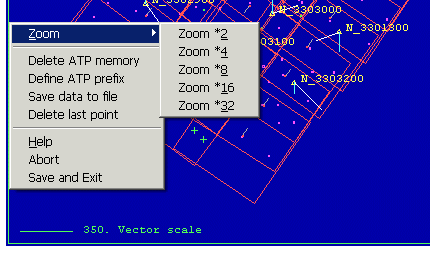
Right mouse click provides a menu for zooming, for defining the prefix for the point numbers, and to save the point coordinates in the world coordinate system to a file with the fixed name addtie.dat. The height of these points is set to Zero.