BINGO 7.0 - November 2017
This page describes BINGO as it existed at the stated release date. For current behavior and requirements, use the current Manual, Reference, and Guides.
General
This BINGO version is a complete revision of all programs and program parts. Nearly all programs are now 64-bit versions. Exceptions are BgoPara (the GUI to set parameters for Bingo, Relax and Skip processing), GeoinEdi (the editor for file geoin.dat) and the support programs PickedPoints, PipeRead and PipeClose. Thereforee a 64-bit windows operating system is now required.
BINGO
There are two Bingo executables in the \Bingo\bin\ directory: BingoMP and Bingo64. The functionality of both is identical; however, BingoMP requires a modern CPU with AVX support (Advanced Vector Extensions) and is faster. Bingo64 has lower requirements to the CPU.
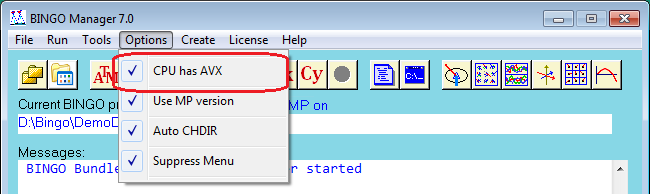
To use the AVX version, check the AVX option in the Bingo Manager’s menu. If you check it, but your CPU does not support it, the Bingo program will fail with the error message “illegal instruction”. In that case un-check it again.
To enhance the speed of adjustments, both BINGO versions can do parallel processing during equation solution (not yet for inversion and data snooping).
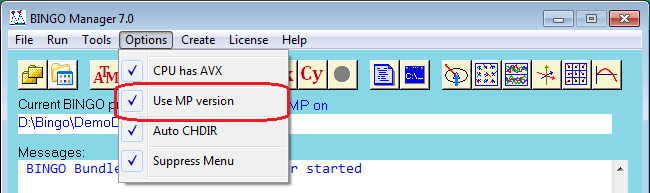
Check this option to switch parallel processing on. However, for small data sets with less than 1000 to 2000 photos, the parallel version will be slower than the linear version because of its overhead.
Depending on the license options you have installed, parallel processing may use all available CPUs and all possible threads on your computer or only two. Full parallel processing requires the multi-processor option.
To check the speed enhancement of parallel processing, extended output of the BINGO programs to the Bingo Manager can be done.
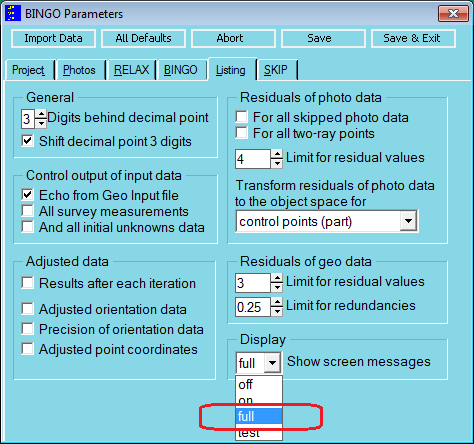
Switching the display option to “full”, intermediate times in [sec] for all processing steps will be displayed.
“CholeskyPA 0.81” indicates, that the parallel version was running and has used 0,81 sec.
Using the linear version in this example, you would see “Cholesky 0.55”.
This output allows to select the best version for the current project.
Trying this with the example data set Fehervar_5cam you see the potential of parallel processing.
Since several years there are more and more multi-camera systems available; e.g. Vexcel Osprey or IGI Quattro-DigiCAM. The camera heads of these systems will be synchronously released. I.e. the relative position of the cameras to each other remain (nearly) the same. This situation can be used to strengthen the functional model of bundle adjustment and keep the projection centers together.
Camera system with five cameras
For the oblique cameras 2 to 4 a vector e has to be defined, pointing from the nodal points of cameras 2 to 4 to the nodal point of camera 1. These vectors e2 to e5 have to be defined in the systems of cameras 2 to 5 each. Camera 1 might have a vector e1 pointing from the nodal point of this camera to a given GPS reference position (e.g. antenna).
Input in file geoin.dat might look like this:
C -------*---------*---------*---------*---------*---------*---------*---------*
C   Emp. standard dev. for vector e' and/or IMU calibration angles
C                   <__s_ex__><__s_ey__><__s_ez__><_S_d_phi><_S_d_ome><_S_d_kap>
ECES                     0.010     0.010     0.010     0.010     0.010     0.010
C
C   Ecc. vector e' (from projection center to antenna) / IMU calibration angles
C   <__Camera_Name_><___ex___><___ey___><___ez___><__d_phi_><_d_omega><_d_kappa>
ECCA         1          -1.120     0.000     1.450       0.0       0.0       0.0
C
ECES                      0.10      0.10      0.10
C
ECCA         2           -0.32      0.00     -0.05     -50.0       0.0       0.0
ECCA         3            0.32      0.00     -0.05      50.0       0.0       0.0
ECCA         4            0.00      0.32     -0.05       0.0      50.0       0.0
ECCA         5            0.00     -0.32     -0.05       0.0     -50.0       0.0
C -------*---------*---------*---------*---------*---------*---------*---------*
The differential rotations d-phi and d-omega are given for cameras 2 to 5 to allow estimation of initial orientation data for all photo positions from given GPS/IMU data.
The project Fehervar_5cam in the DemoData is a real example from an Osprey five-camera system.
The information how to build photo names from GPS/IMU event numbers must be defined in the GPS/IMU data file. In the given example project the first line is the definition line:
(NA_+ FW_+ BW_+ LE_+ RI_+)
Data lines are:
Event-no.  Easting    Northing    Height       phi     omega     kappa
05_0069  599473.169  203299.323  1725.890   -0.1984    0.1870  -85.3676
05_0070  599479.398  203115.739  1722.949   -0.1223    0.1439  -87.8631
        :        :           :          :          :         :         :
From this input Bingo builds the photo names:
NA_05_0069
FW_05_0069
BW_05_0069
LE_05_0069
RI_05_0069
NA_05_0070
FW_05_0070
    :
These names are used to create file image.dat. From this information Bingo estimates initial orientation data for all photos and creates conditions to connect each group of photos 2 to 5 to photo 1.
Building of photo names from the definition line is as follows: For every of the names in the brackets a photo number will be created. The event number will replace the plus sign. The type of brackets has no influence. Allowed are: [] () {} <>. The definition line might look e.g. as well as follows:
<+1 +2 +3 +4 +5>
In this example the photo names would be:
05_00691
05_00692
05_00693
05_00694
05_00695
05_00701
05_00702
    :
The center camera (if any) has to be the first one in the definition line. All GPS/IMU data will be applied for the first camera. This data will NOT be copied for every of the five photos, but cameras 2 to 5 will be connected to camera 1 by conditions! This is mathematically rigorous. The number of cameras hold together in this way is not limited.
However, in case of 4 oblique cameras we have a special situation: Normally the nadir camera is missing. Thereforee BINGO creates a circle of conditions.
An example is given in the DemoData set Olbique_4cam.
The described data up to here allow to get initial orientation data for all photos of the multi-camera systems. To keep the projection centers together, an additional step is needed: The stability precision for the camera system has to be defined. From construction it should be in the range of 1 mm, however, there are additional influenced in the air like release time synchronization and irregular movements of the airplane. Therefore a precision of 1 cm or 10 cm might be used.
C -------*---------*---------*---------*---------*---------*---------*---------*
C   Standard deviations for conditions to hold projection centers together:
C   -----------------------------------------------------------------------
C   Emp. stand. dev. for stereometric camera conditions
C                   <___s_x__><___s_y__><___s_z__>
SMES                      0.02      0.02      0.02
C -------*---------*---------*---------*---------*---------*---------*---------*
The SMES input statement in file geoin.dat include te conditions to keep the projection centers together. Camera number one has to be a member of the set. This is not required in case of 4 cameras.
The possibility to process push broom line scanner images from airplanes is again available in BINGO.
The CAPA statement in file itera.dat has been extended by the maximum photo coordinates x´ and x´ per camera to allow better presentation of effects of additional parameters in program ADPLO.
Example:
- <___Camera_ID><_c><_x_PPA><_y_PPA><_s_c><sx_PPA><sy_PPA><_x_max><_y_max>
CAPA               1   82.0000    0.0000    0.0000                                 26.7228   20.0820
CAPA               2  123.0000    0.0000    0.0000                                 26.6731   19.9507
CAPA               3  122.9950    0.0000    0.0000                                 26.7168   19.8416
CAPA               4  123.0040    0.0000    0.0000                                 26.6231   20.0477
CAPA               5  122.9990    0.0000    0.0000                                 26.6114   19.8234
ADPLO
Graphical presentation of image deformation is now limited to a rectangular where really points have been measured in the images:
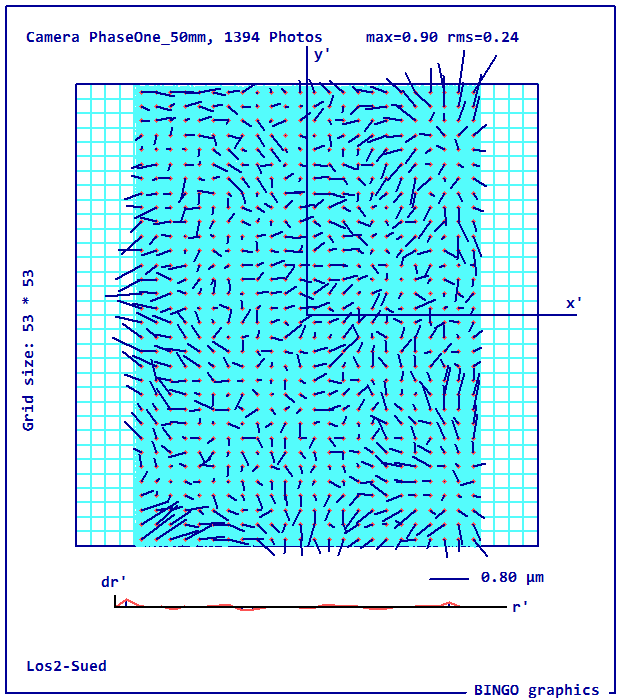
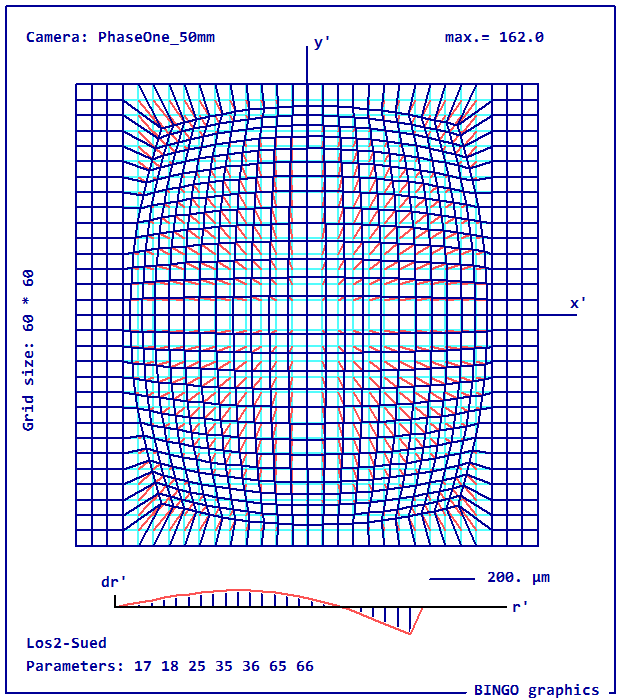
A bug in graphical presentation of additional parameter no. 39 has been corrected.
The graphical presentation of IMPLO shows now beside the maximum deformation as well the rms value.
SamBatch
This new program allows running Samba functionality in batch mode e.g. from BgoBatch. It reads at first any Sambatch.ini file from the \Bingo\bin\ directory. This ASCII file has to have three lines with the file names for image.dat, geoin.dat and skip.dat, and one line with three values according to requested number of remaining points in the three areas (red, blue and yellow) shown in the GUI of program Samba. The format for these three values is 3I5 (three integer values with 5 digits of blanks each.
Example:
If the ini-file is missing the defaults 2 2 2 will be used.
BgoBatch
SamBatch is a new command in a Bingo batch file. It has no parameters. The commands to start Bingo programs have been changed. The complete list of commands is now:
   CD  directory_name            Change directory (first command in batch file)
   COPY  file_name file_name     to copy files
   REN   file_name file_name     to rename a file
   SamBatch
   Relax [project_file_name]     to start RELAX
   Bingo64 [project_file_name]   to start Bingo SSE3 version
   BingoMP [project_file_name]   to start Bingo AVX version
   Skip [project_file_name]      to start Skip
   Cycle                         to start Bingo and Skip in a cycle
   Report [report_file_name]     to create a Bingo pdf report file
REPLO
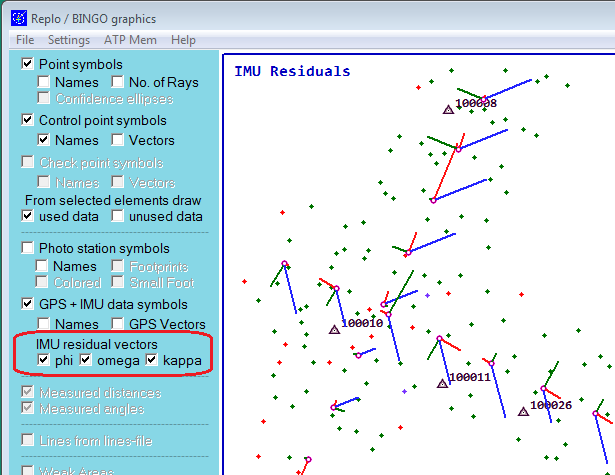
Program Replo has a new feature and can now display the IMU residuals in form of vectors in three axes.
      vphi:     read
      vomega:   green
      vkappa:   blue